Description
10 Branded AI Video Prompt Systems – Complete Bundle
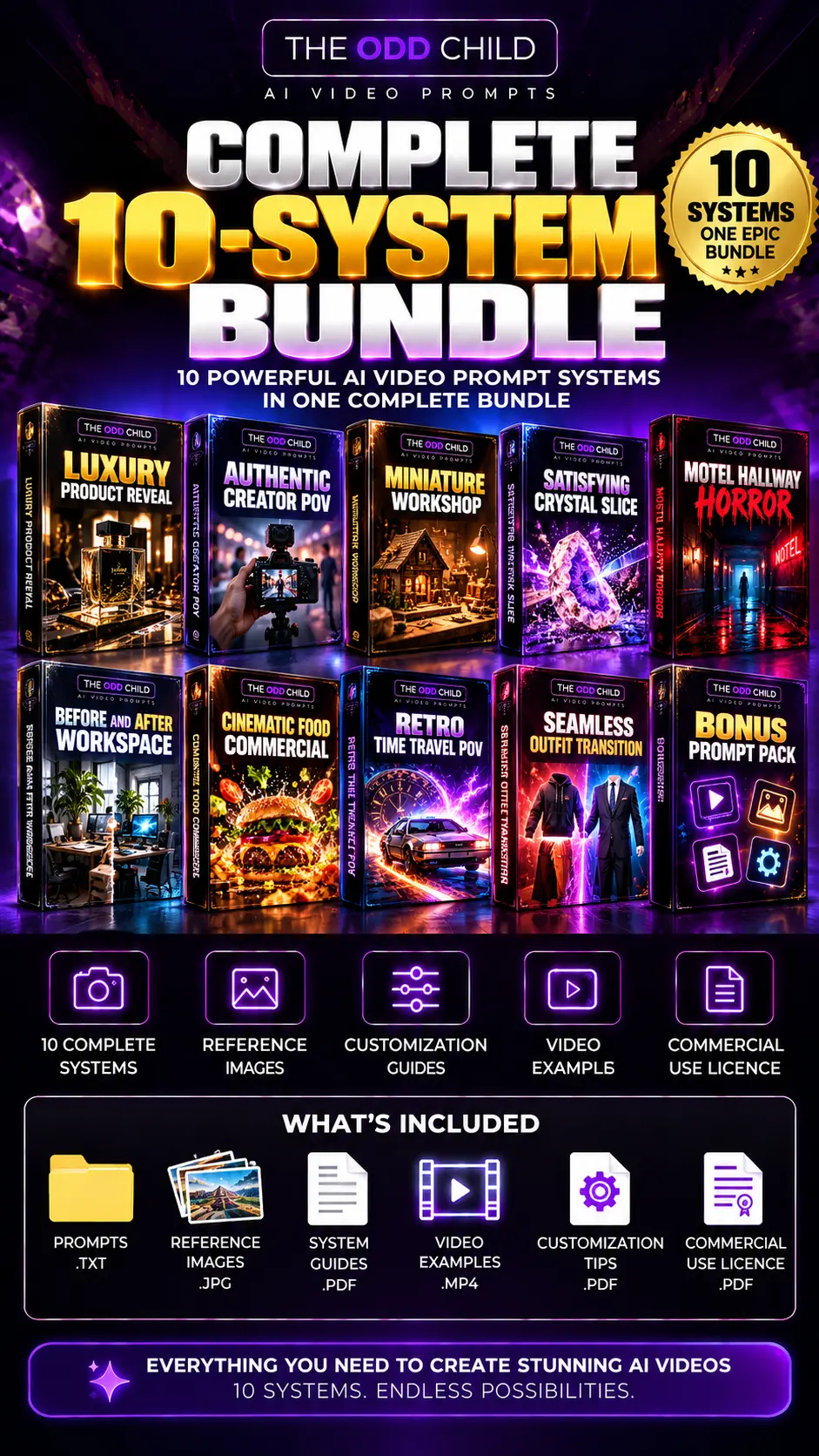
Discover ten cinematic image-to-video concepts from The Odd Child. Each individual system includes a WebP reference image, original image and animation prompts, and customizable instructions.
Choose 1 System or Get All 10
Individual AI video prompt systems: $2.49 CAD each.
Complete 10-system bundle: $9.00 CAD. Choose the complete bundle using the purchase button above, or explore the ten individual prompt systems below. The videos are previews; the download contains prompts, reference images, customization files, and guides—not finished MP4 videos.
Impossible Room Transformation
Turn a quiet living room into an immersive indoor forest.
$2.49 CAD per systemVIEW DETAILS →ADD TO CART
Luxury Product Reveal
Create a premium studio product reveal with cinematic light and motion.
$2.49 CAD per systemVIEW DETAILS →ADD TO CART
Authentic Creator POV
Capture a warm, believable creative moment with natural movement.
$2.49 CAD per systemVIEW DETAILS →ADD TO CART
Miniature Workshop
Bring tiny workers and a giant mechanical watch to life.
$2.49 CAD per systemVIEW DETAILS →ADD TO CART
Satisfying Crystal Slice
Animate a crystal pear slice with glowing light refraction.
$2.49 CAD per systemVIEW DETAILS →ADD TO CART
Motel Hallway Horror
Build slow-burning suspense inside a neon-lit motel corridor.
$2.49 CAD per systemVIEW DETAILS →ADD TO CART
Before and After Workspace
Turn a cluttered desk into a clean, organized creative setup.
$2.49 CAD per systemVIEW DETAILS →ADD TO CART
Cinematic Food Commercial
Create a sparkling citrus beverage commercial with cinematic liquid motion.
$2.49 CAD per systemVIEW DETAILS →ADD TO CART
Retro Time Travel POV
Step through a doorway and into a nostalgic 1970s diner.
$2.49 CAD per systemVIEW DETAILS →ADD TO CART
Seamless Outfit Transition
Create smooth transitions between three coordinated outfits.
$2.49 CAD per systemVIEW DETAILS →ADD TO CART
How Image-to-Video Creation Works
1. Choose a concept. Pick an individual system or the collection. 2. Copy the image prompt. Use a compatible AI image tool to create your scene. 3. Animate your image. Use the matching motion prompt in a compatible image-to-video generator. 4. Customize and export. Adjust your prompts, review the results and export your own video.
What’s Included in the Complete Bundle
10 numbered prompt-system folders, each with a reference WebP image, a COPY AND CREATE TXT prompt file, and a MAKE IT YOURS TXT customization file, plus five supporting guides: START HERE, 10 IDEAS AT A GLANCE, WHAT IS INCLUDED, TROUBLESHOOTING, and LICENSE AND USAGE TERMS.
Who It’s For
Ideal for content creators, digital artists, video editors, social media marketers and small businesses exploring cinematic AI-generated visuals.
How to Get Better Results with AI Video Prompt Systems
Start with one concept and generate a clear reference image before creating motion. The ten AI video prompt systems cover different visual challenges, so keep the environment, lighting, subject and camera direction consistent within each project. Use the accompanying customization file to change details deliberately rather than replacing every instruction at once.
For example, a product reveal benefits from controlled studio lighting, while a room transformation needs stable architecture and a recognizable starting scene. A fashion transition depends on consistent character identity and framing. Review each generated clip for unexpected changes, awkward movement and distracting background shifts, then adjust the relevant image or animation prompt.
These AI video prompt systems are designed to help you test creative directions across short-form content, promotional concepts and visual storytelling. Video quality and supported controls vary by platform, and you may need several generations to achieve the result you want.
Helpful AI Image-to-Video Resources
For practical guidance on creating reference images and writing motion prompts, explore these official educational resources:
- OpenAI – Images in ChatGPT explains how to create and refine AI-generated reference images.
- Runway – Image-to-Video Prompting Guide covers motion descriptions, camera movement and visual continuity.
These links are optional learning resources; the bundle does not include access to these platforms.
See the Prompt-to-Video Workflow
The ten video previews above are demonstrations of the creative concepts. Each prompt system includes a reference WebP image, an image prompt and a separate animation prompt. Use the reference image and written instructions to develop your own result. The preview clips are examples, not a guarantee that every AI tool will produce the same output.
- Starting point: Open the included WebP reference image and copy the matching image prompt.
- Animation: Generate or upload your reference image to an image-to-video tool, then apply the matching motion prompt.
- Result: Compare your output with the preview and use MAKE IT YOURS to adjust subject, lighting, camera movement and effects.
AI Tool Compatibility and Generation Costs
These are editable text prompts and reference images, not a proprietary application. You can adapt them for AI image tools and image-to-video services that support the relevant inputs and controls. ChatGPT image generation can be used to develop reference images; image-to-video tools such as Runway can be used where their current features support image uploads and motion prompting. Other generators may require rewritten prompts, different settings or additional steps. Specific platform compatibility has not been independently validated for every prompt in this bundle.
Potential additional costs: The $9 CAD purchase covers the downloadable bundle only. Third-party generators may require an account, subscription or paid generation credits. Repeated attempts, longer clips, higher resolutions and exports may consume additional credits depending on your provider. No third-party generation credits are included.
About the Video Previews and Reviews
The ten preview videos demonstrate the concepts being offered; finished MP4 videos are not included in the download. Results may differ due to model behaviour, prompt interpretation, settings and retries. Customer reviews, when available, should reflect genuine experiences; preview videos are examples of creative output, not customer testimonials.
Important Information
These are digital image and video prompts with reference images, not finished MP4 videos or subscriptions to an AI platform. Compatible generation tools are required, and separate fees or credits may apply. Results vary by generator and settings.


Well-organized video prompts that make creating professional, creative AI videos easier and faster. Great for content creators!